
Mobile access
PantherBet mobile access: browser play instead of an app download
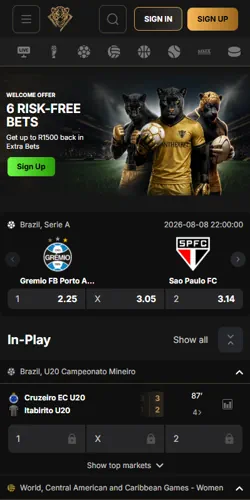
PantherBet South Africa runs entirely through your mobile browser, licensed under Bookmaker Licence 10194613-002 issued 1 April 2025 by the Western Cape Gambling and Racing Board, with no APK or App Store listing to verify before you play.
Why no APK
Why PantherBet skips a downloadable app
Most South African operators ship a native APK measured in tens of megabytes; PantherBet does not. There is nothing to sideload, no unknown-sources permission to grant, and no separate app-store listing to authenticate against phishing clones.
Instead, the sportsbook and casino load as a responsive HTML5 site, then convert into a Progressive Web App (PWA) shortcut that sits on your home screen and opens without a browser address bar. That shortcut behaves like an app icon but stays tied to the browser engine already installed on your phone, so updates apply the moment you reload the page rather than through a store update queue.
Android setup
Setting up the home-screen shortcut on Android
Open pantherbets.co.za in Chrome, tap the three-dot menu, then select Add to Home Screen. Chrome version 68 or later is required for the prompt to appear automatically; older builds still let you add the shortcut manually through the same menu path.
Confirm the name PantherBet in the dialog and tap Add. The icon then launches full-screen, without the address bar, and keeps your last logged-in session unless you clear site data separately from your regular browser history.
iOS setup
Adding PantherBet to the iPhone home screen
Safari handles the shortcut differently from Chrome. Open pantherbets.co.za, tap the Share icon, then choose Add to Home Screen from the list.
Full PWA push-notification support on iOS needs Safari 16.4 or later; on earlier versions the shortcut still opens and functions but will not deliver background alerts for settled bets or promotions. Rename the shortcut if you prefer, tap Add, and the icon appears on your home screen exactly where any downloaded app would sit.
There is no separate iOS build to keep in sync — the same web session powers both the browser tab and the shortcut, so a login on one carries over to the other.
Data and storage
Data, storage and connection limits worth knowing
Browser-based play trades one convenience for another. A typical SA betting APK installs at 20–90 MB before first launch; the PantherBet shortcut installs almost nothing locally, since the interface streams from the server each session.
- No offline mode — closing your connection mid-session drops any unsaved bet slip
- No background download queue, so there is nothing to update manually after a version release
- Live odds and crash-game rounds require a stable connection; a dropped 3G signal can desync a live round in progress
- Clearing your phone's browser cache removes the shortcut's stored login, unlike a native app's separate data partition
The trade-off is storage against dependency: nothing to uninstall, but nothing that keeps working without signal either.
Account limits
Withdrawal limits that apply regardless of device
Accessing PantherBet through a shortcut instead of an installed app changes nothing about your account tier or its caps. Every player starts at Newcomer level with a withdrawal ceiling of R5,000 per day, R25,000 per week and R75,000 per month, rising only as comp points accumulate.
Reaching Quartz Beginner (100–499 points) lifts the ceiling to R10,000 daily, and each tier above scales further up to Diamond Legend's R100,000 daily cap. FICA and KYC verification gate every withdrawal on every tier, browser or otherwise — the payment method and account status decide the timeline, not the access route.
| Period | Limit |
|---|---|
| Per day | R5,000 |
| Per week | R25,000 |
| Per month | R75,000 |
Getting started
Registering and claiming spins through the shortcut
Registration runs the same whether you open the shortcut or a regular tab: enter your email, set a password, add your SA ID-matching name and confirm you are 18 or older.
Entering promo code HIPANTHER during signup credits 50 free spins on Gates of Olympus at a R0.20 bet value per spin, with no deposit required first. Deposit-linked spins work differently: the First Deposit welcome tier credits up to 250 Bonus Spins on the same title once a R1,000+ deposit is made, subject to ×30 wagering on winnings.